
When employing NetSource to handle your migration from ProductCart to Shopify, importing data to Shopify from ProductCart is possible with our automated data migration process.
If you elect to use our migration process, Products and Customers will be imported at the beginning of the project to the Shopify development site. Once the Shopify development website is approved and goes live, all Orders and any new Products, Categories and/or Customers will be imported.
What's Possible with the Data Transfer Process:
Please note that the information below covers what we believe are the most relevant points to typical ProductCart to Shopify Data Transfers , but may not cover everything specific to your individual requirements. Always consult with our team to answer any questions and verify our process covers your data transfer needs.
PRODUCTS
- Inactive products will not be imported.
- "Not for Sale" products can be transferred and displayed on Shopify. The "Not for Sale" message used in ProductCart will be carried over as a Shopify meta field in the product description and inventory settings will be adjusted accordingly.
- Product reviews and ratings are transferable through select Shopify apps, but not directly into Shopify. Speak with your sales contact for details and limitations.
- Tiered pricing and discounts by product quantity will not be transferred.
- Each product imported has a limit of 9 images total including the main product image. This is only an import limitation, as more images can be added within Shopify after the import.
- By default, the long description will be used for the product description. If there is a product short description, it will be added to a created product meta field called ‘shortDesc’ which can be used on the Shopify product layout.
- Standard Products with or without options, as well as Apparel Products, can be imported. Apparel Products are created as Shopify "variants" which function very similar to how sub-products do in ProductCart.
- Shopify has a limit of 2,048 variants (sub-products) per product.
- 3 Options Per Product Limit (that's a Shopify hard rule). Apps are needed for more options per product and ProductCart products with more than 3 options will not be imported. Options are like color, size, fabric, etc.
- ProductCart category images and descriptions will get carried over to Shopify Collections.
- 301 Redirects for Category and Product Pages are automatically built on import.
- Product and Category SEO Title Tags and Meta Descriptions will be imported to Shopify.
- Category hierarchy (sub-category structure) past 3 levels deep will not be carried over into Shopify menu navigation, due to Shopify's framework and best practices. Categories are called "collections" in Shopify. Apps can be used to expand menu capabilities.
- Brands are imported with products via tags, but brand collections must be setup manually.
- All ProductCart sub-categories will be brought in as collections in Shopify past 3 levels deep, however, the associations will need to be mapped by the designated web designer to show as expected.
- Shopify collection pages do not show sub-collections by default. Custom design or programming is necessary to implement this page structure.
- Configurator Products will require the NetSource Configurator app to accommodate their setup and operation in Shopify.
CUSTOMERS
- All customers are imported into Shopify with a meta field value called 'customerCategory' which contain the ProductCart "customer type" like retail, wholesale, B2B, or any custom type name created in ProductCart. These values can be used to build groups or "customer segments" which can help reproduce the customer types that existed in ProductCart.
- Customers who are in "Locked" or "Suspended" status will not be imported. Check the Other Settings tab under the Customer Details page in ProductCart to verify.
- Tax Exemption status is included with the import.
- Special customer pricing/discounts are not imported.
- Duplicate records of customers will be ignored - like in guest checkouts.
- Customer passwords are not imported to Shopify. Each customer will need to establish a new password on the first Shopify login.
ORDERS
- They are dated by import date for Shopify - but have original purchase date/closed out date in record.
- Customers will be able to view imported orders.
- Orders with the status of PROCESSED and higher will be imported.
- Orders are brought into Shopify AFTER the store is set LIVE on Shopify.
- Order "Admin Comments" which are plain text within ProductCart orders are carried over to Shopify.
- Our import process only brings in ACTIVE products, however, PAST orders in ProductCart which are transferred to Shopify will reference both active and inactive products due to the nature of the order information containing reference to all products associated with each order. But there is no way to connect inactive products to imported orders, nor can the import even tie imported orders with active products via "links" to the new location of the product on Shopify. The past orders can better be thought of as a picture of the past, not an interactive piece.
OTHER
- General content pages will NOT be imported like homepage, about us, blogs, and custom pages.
- 301 redirects will need to be manually created for ProductCart content pages.
- ProductCart Themes, Page Templates, Header/Footers, Navigational Menus, Forms, Customizations, Features & Functionality Unique to ProductCart, ProductCart "Catalog" folder for all images, documents and downloads are not part of the data import into Shopify.
- No tax or shipping settings, nor integrations, will be imported or transferred.
- Any internally linked elements (relative links) will not be adjusted and could result in 404s if not manually resolved. This includes certain page and document links in the ProductCart environment located within the product or category descriptions.
- Shopify has a 250 Meta Field limitation per resource (Products/Customers/Orders). If you currently use Custom Search Fields in ProductCart ensure that number does not exceed this limit.
IMPORTANT NOTE
If your ProductCart store includes any products, customers, orders, data fields, or any features and functionality that are custom or unique to ProductCart—and not standard within Shopify—this data may not be included in the transfer process. Please consult with a sales representative for more details.
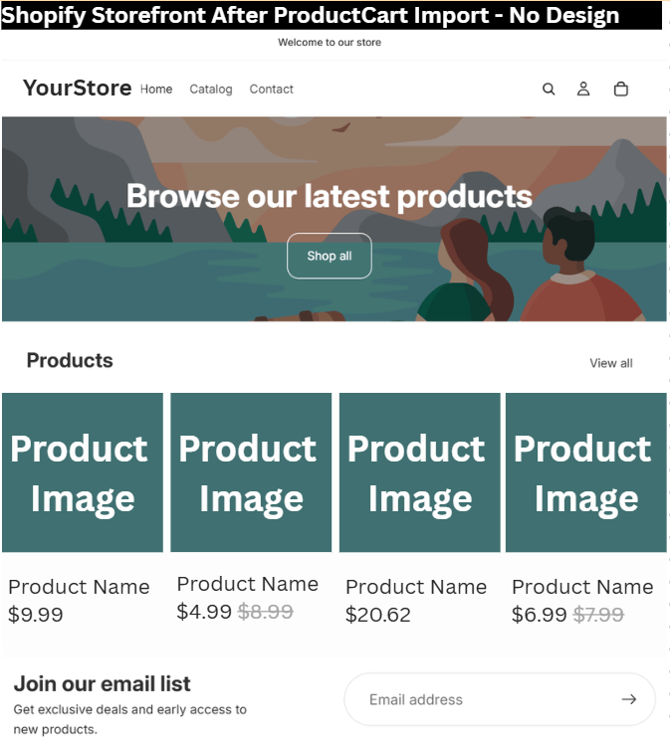
VISUAL EXAMPLE OF WHAT TO EXPECT AFTER IMPORT (Without Design)
HOME PAGE - Horizon Theme Right After Import
You'll notice the default theme menu is used, important products will show in a grid. No logo, colors, homepage content will be carried over. The website design will be completely stock.
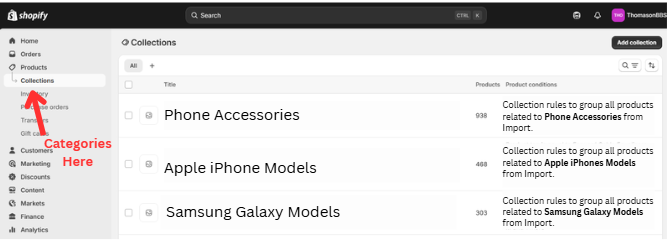
WHERE ARE THE CATEGORIES?
Your ProductCart categories will be successfully converted into collections with rules assigned to them to retain the products which were assigned to them in ProductCart. These rules can be modified if desired to include or exclude other products or even other collections.
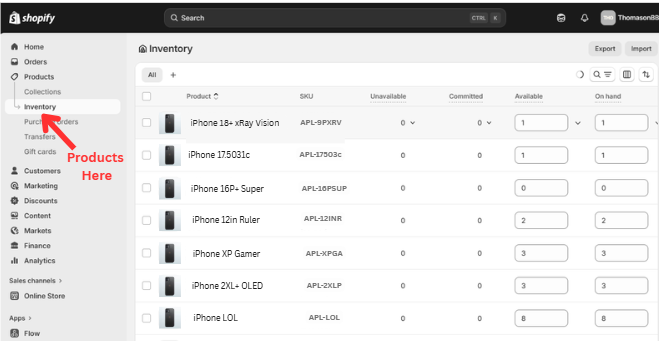
WHERE ARE THE PRODUCTS?
Products will be found under Products >> Inventory on the Main Shopify Admin navigation. Here you can sore and search existing products by name, imported SKU and more.
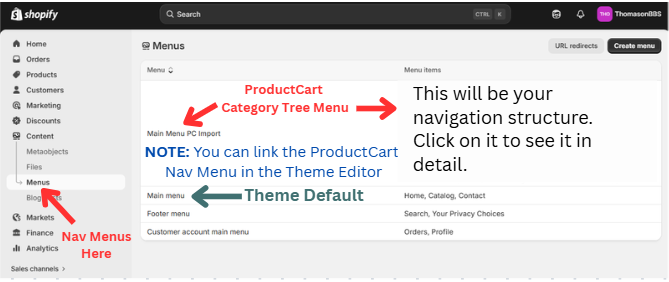
WHERE IS MY PRODUCT CATEGORY TREE FOR NAVIGATION?
No content or special pages get imported from ProductCart, but the process does carry over the former category hierarch up to 3 levels deep. Beyond that, there is no defined association without being mapped manually. You can replace the "Theme Default" main menu with the "PC Import" within the Theme Editor in Shopify.
There is plenty of online help for editing themes and setting up your Shopify store from start to finish. However, you may reach out to NetSource at anytime for quotes to do the heavy lifting for you!
CLOSING REMARKS
We recommend reaching out to our team with any questions or concerns so we can review your data structure and address any potential discrepancies prior to the initial Shopify import. Our goal is to identify and resolve these items as early as possible.
Please note that accommodating certain custom data may involve additional costs, or in some cases, may not be feasible or possible due to Shopify platform limitations.