
PLEASE NOTE:
Due to some minor bug fixes, you may need to use this integration even if you installed ProductCart v5.5.0. There is no need to reinstall v5.5.0, just overlay the files found in this update (look for "ups_v5_5" in the file set) over your existing ones.
These are the two shipping services included in this upgrade:
#1 - United States Postal Service (USPS) Upgrade - Version 3 / API
Complete details on this latest integration of can be found in this support article.
#2 - United Parcel Service (UPS) Upgrade - OAuth2
Complete details on this latest integration of can be found in this support article.
If you already have UPS OAuth2 installed, this update may require you to reconnect your UPS account through settings using the "Refresh" button.
BUG FIX FOR V5.2.1 TO V5.4.1
If you are getting an 500 error when trying to open your orders within the control panel like this:

Or you see this error code when trying to open up the file from the server:
Microsoft VBScript runtime error '800x000d'
Type mismatch: 'getAuthorizeNetToken'
If you are using the most current install set with the name "UPS_USPS_Update_040726.zip", then folder versions v5.2.1 to v5.4.1, the USPS / UPS combo upgrade has a missing "include" statement in the following file.
/pcadmin/OrdDetails.asp
Open this file and add the following line of code to the include statements.
<!--#include file="../includes/gateways/authorizeNet/authorizenet.asp"-->
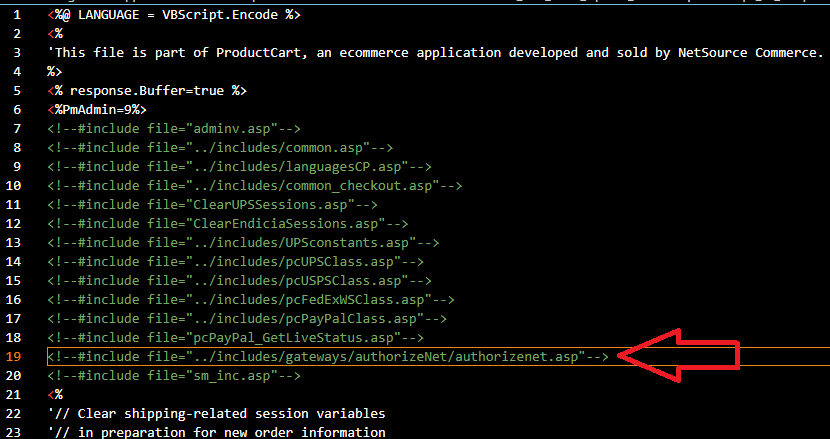
Save the changes and ensure this is updated on your server. After this, the problem should be resolved.
Contact Support if this fails to solve your issues.